Решил я на днях установить EM GC 11g. Скачав дисрибутив EM GC 11g с OTN, я начал установку. Устанавливать буду как всегда на хост OVM. В качестве гостевой ОС - OEL 5.5 x86.
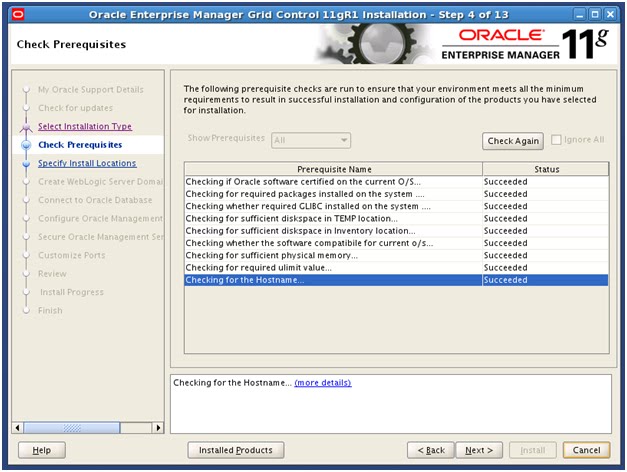
Начнем с prerequisites, благо Hardware и Operating System Requirements соблюдены.
Теперь проверим Package Requirements.
[root@em ~]# rpm -qa | grep rng-utils
rng-utils-2.0-1.14.1.fc6
[root@em ~]# rpm -qa | grep make-3.81
make-3.81-3.el5
[root@em ~]# rpm -qa | grep binutils-2.17.50.0.6
binutils-2.17.50.0.6-14.el5
[root@em ~]# rpm -qa | grep libaio-0.3.106
libaio-0.3.106-5
[root@em ~]# rpm -qa | grep glibc-common
glibc-common-2.5-49
[root@em ~]# rpm -qa | grep gcc-4
libgcc-4.1.2-48.el5
gcc-4.1.2-48.el5
[root@em ~]# rpm -qa | grep compat-libstdc
compat-libstdc++-33-3.2.3-61
compat-libstdc++-296-2.96-138
[root@em ~]# rpm -qa | grep libstdc
compat-libstdc++-33-3.2.3-61
libstdc++-devel-4.1.2-48.el5
compat-libstdc++-296-2.96-138
libstdc++-4.1.2-48.el5
[root@em ~]# rpm -qa | grep libstdc++-devel
libstdc++-devel-4.1.2-48.el5
[root@em ~]# rpm -qa | grep setarch
setarch-2.0-1.1
[root@em ~]# rpm -qa | grep sysstat
sysstat-7.0.2-3.el5
[root@em ~]# rpm -qa | grep compat-db
compat-db-4.2.52-5.1
Как видно, все необходимые пакеты установлены. Далее проверим Operating System Groups and Users Requirements.
[oracle@em ~]$ id
uid=500(oracle) gid=501(oinstall) groups=500(dba),501(oinstall),502(oper)
Далее, проверим Unique Host Name and Static IP Address Requirements.
Главное использовать статический IP адресс, иначе, установить софт не получится.
[root@em ~]# ifconfig
eth0      Link encap:Ethernet  HWaddr 00:16:3E:48:36:E1
          inet addr:192.168.2.100  Bcast:192.168.2.255  Mask:255.255.255.0
          inet6 addr: fe80::216:3eff:fe48:36e1/64 Scope:Link
          UP BROADCAST RUNNING MULTICAST  MTU:1500  Metric:1
          RX packets:579 errors:0 dropped:0 overruns:0 frame:0
          TX packets:103 errors:0 dropped:0 overruns:0 carrier:0
          collisions:0 txqueuelen:1000
          RX bytes:49210 (48.0 KiB)  TX bytes:14149 (13.8 KiB)
...
[root@em ~]# hostname
em
[root@em ~]# ping em
PING em.us.oracle.com (192.168.2.100) 56(84) bytes of data.
64 bytes from em.us.oracle.com (192.168.2.100): icmp_seq=1 ttl=64 time=0.017 ms
64 bytes from em.us.oracle.com (192.168.2.100): icmp_seq=2 ttl=64 time=0.009 ms
...
Далее, UMASK Value и File Descriptor Requirements. Добавляем в .bash_profile строку с umask 022.
[oracle@em ~]$ /bin/sh -c "ulimit -n"
131072
Далее, JDK Requirements. Я использую OEL х86, поэтому отдельно устанавливать JDK не нужно (дистрибутив WLS содержит JDK). Но если вы планируете устанавливать на другие ОС, то нужно иметь в виду, что может потребоваться поставить отдельно JDK.
На этом проверка хоста закончена. Теперь приступим к установке Oracle WebLogic Server.
Установка OWLS хорошо описана в note 1063762.1.
Скачиваем дистрибутив WLS 10.3.2. и запускаем установку.
[oracle@em ~]$ chmod a+x wls1032_linux32.bin
[oracle@em ~]$ ls -l
total 4713056
-rw-r--r-- 1 oracle oinstall 1346829079 Aug 15 08:08 GridControl_11.1.0.1.0_Linux_1of3.zip
-rw-r--r-- 1 oracle oinstall 1504566656 Aug 16 15:12 GridControl_11.1.0.1.0_Linux_2of3.zip
-rw-r--r-- 1 oracle oinstall 1336577721 Aug 16 15:08 GridControl_11.1.0.1.0_Linux_3of3.zip
-rwxr-xr-x 1 oracle oinstall  633454825 Aug 18 09:12 wls1032_linux32.bin
[oracle@em ~]$ ./wls1032_linux32.bin
Extracting 0%....................................................................................................100%
ВАЖНО. Перед установкой убедитесь, что у вас правильно прописан /etc/hosts. А именно, нет задвоений записей и шаблон следующий:
127.0.0.1 localhost.localdomain localhost
<ip address> <fqdn> <short name>
В противном случае - BUG 11821959, решение в note 1302190.1.
Мой /etc/hosts
[root@em ~]# cat /etc/hosts
127.0.0.1 localhost.localdomain localhost
192.168.2.100 em.us.oracle.com em
[root@em ~]#
Вернемся к установке.
Нажимаем next.
Выбираем Middleware хоум и нажимаем Next.
Вводим имя пользователя и пароль для доступа на support.oracle.com. Или отказываемся от этого (в моем случае).
Обязательно нужно выбрать Typical и опять next.
Выбираем WLS хоум и нажимаем Next.
Нажимаем Next.
Процесс установки.
Установка WLS закончена.
Далее необходимо установить патч на WLS (note 1072763.1). Скачиваем Patch WDJ7. Копируем его в middleware_home/utils/bsu/cache_dir и устанавливаем его с помощью bsu.
[oracle@em cache_dir]$ unzip WDJ7.zip
Archive:  WDJ7.zip
  inflating: 4D53.jar
  inflating: NIXN.jar
  inflating: patch-catalog.xml
  inflating: prod-info.xml
  inflating: WDJ7.jar
  inflating: XLXA.jar
[oracle@em cache_dir]$
[oracle@em ~]$ cd /u01/app/oracle/product/middleware/utils/bsu/
[oracle@em bsu]$ ./bsu.sh
Выбираем патч WDJ7 и нажимаем Apply.
На этом установка патча закончена. Также, необходимо убедиться, что в middleware_home/registry.xml прописан правильное имя хоста.
[oracle@em middleware]$ cat registry.xml | grep host
 <host home="/u01/app/oracle/middleware" name="em">
 </host>
[oracle@em middleware]$
Теперь установим Oracle Database. Я не буду детально описывать процесс установки, я лишь опишу ряд требований.
1. Необходимо использование Partitioning
2. Необходимо удалить пользователя SYSMAN.
[oracle@em ~]$ sqlplus / as sysdba

SQL*Plus: Release 11.2.0.2.0 Production on Tue Aug 23 10:40:44 2011

Copyright (c) 1982, 2010, Oracle.  All rights reserved.

Connected to:
Oracle Database 11g Enterprise Edition Release 11.2.0.2.0 - Production
With the Partitioning, OLAP, Data Mining and Real Application Testing options

SQL> SELECT COUNT(*) FROM ALL_USERS WHERE USERNAME='SYSMAN';

  COUNT(*)
----------
         1

SQL>  alter user sysman account unlock;

User altered.

SQL> alter user sysman identified by oracle;

User altered.

SQL> exit
[oracle@em ~]$ lsnrctl start

LSNRCTL for Linux: Version 11.2.0.2.0 - Production on 23-AUG-2011 10:47:53

Copyright (c) 1991, 2010, Oracle.  All rights reserved.

Starting /u01/app/oracle/product/11.2.0/dbhome_1/bin/tnslsnr: please wait...

TNSLSNR for Linux: Version 11.2.0.2.0 - Production
Log messages written to /u01/app/oracle/diag/tnslsnr/em/listener/alert/log.xml
Listening on: (DESCRIPTION=(ADDRESS=(PROTOCOL=tcp)(HOST=em)(PORT=1521)))

Connecting to (ADDRESS=(PROTOCOL=tcp)(HOST=)(PORT=1521))
STATUS of the LISTENER
------------------------
Alias                     LISTENER
Version                   TNSLSNR for Linux: Version 11.2.0.2.0 - Production
Start Date                23-AUG-2011 10:47:53
Uptime                    0 days 0 hr. 0 min. 0 sec
Trace Level               off
Security                  ON: Local OS Authentication
SNMP                      OFF
Listener Log File         /u01/app/oracle/diag/tnslsnr/em/listener/alert/log.xml
Listening Endpoints Summary...
  (DESCRIPTION=(ADDRESS=(PROTOCOL=tcp)(HOST=em)(PORT=1521)))
The listener supports no services
The command completed successfully
[oracle@em ~]$
[oracle@em ~]$ $ORACLE_HOME/bin/emca -deconfig dbcontrol db -repos drop -SYS_PWD oracle -SYSMAN_PWD oracle

STARTED EMCA at Aug 23, 2011 10:48:19 AM
EM Configuration Assistant, Version 11.2.0.0.2 Production
Copyright (c) 2003, 2005, Oracle.  All rights reserved.

Enter the following information:
Database SID: em
Listener port number: 1521

----------------------------------------------------------------------
WARNING : While repository is dropped the database will be put in quiesce mode.
----------------------------------------------------------------------
Do you wish to continue? [yes(Y)/no(N)]: Y
Aug 23, 2011 10:48:27 AM oracle.sysman.emcp.EMConfig perform
INFO: This operation is being logged at /u01/app/oracle/cfgtoollogs/emca/em/emca_2011_08_23_10_48_19.log.
Aug 23, 2011 10:48:28 AM oracle.sysman.emcp.EMDBPreConfig performDeconfiguration
WARNING: EM is not configured for this database. No EM-specific actions can be performed. Some of the possible reasons may be:
 1) EM is configured with different hostname then physical host. Set environment variable ORACLE_HOSTNAME= and re-run EMCA script
 2) ORACLE_HOSTNAME is set. Unset it and re-run EMCA script
Aug 23, 2011 10:48:28 AM oracle.sysman.emcp.EMReposConfig invoke
INFO: Dropping the EM repository (this may take a while) ...
Aug 23, 2011 10:58:16 AM oracle.sysman.emcp.EMReposConfig invoke
INFO: Repository successfully dropped
Enterprise Manager configuration completed successfully
FINISHED EMCA at Aug 23, 2011 10:58:16 AM
[oracle@em ~]$

SQL> SELECT COUNT(*) FROM ALL_USERS WHERE USERNAME IN ('SYSMAN','SYSMAN_MDS');

  COUNT(*)
----------
         0

SQL> SELECT FILE_NAME FROM DBA_DATA_FILES WHERE UPPER (TABLESPACE_NAME) LIKE 'MGMT%';

no rows selected

SQL>
3. Fine-Grained Access Control Requirements
SQL> select value from v$option where parameter = 'Fine-grained access control';

VALUE
----------------------------------------------------------------
TRUE

SQL>
4. UNDO Tablespace Size Requirements
SQL> alter database datafile '/u02/em/undotbs01.dbf' resize 200M;

Database altered.

SQL>
5. База данных должна быть в режиме Archivelog.
SQL> select log_mode from v$database;

LOG_MODE
------------
ARCHIVELOG

SQL>
6. Инициализационные параметры
SQL> show parameter remote_login_passwordfile

NAME                                 TYPE        VALUE
------------------------------------ ----------- ------------------------------
remote_login_passwordfile            string      EXCLUSIVE
SQL>


SQL> show parameter statistics_level

NAME                                 TYPE        VALUE
------------------------------------ ----------- ------------------------------
statistics_level                     string      TYPICAL
SQL>

SQL> show parameter timed_statistics

NAME                                 TYPE        VALUE
------------------------------------ ----------- ------------------------------
timed_statistics                     boolean     TRUE
SQL>
SQL> show parameter undo_management

NAME                                 TYPE        VALUE
------------------------------------ ----------- ------------------------------
undo_management                      string      AUTO
SQL>
SQL> show parameter workarea_size_policy

NAME                                 TYPE        VALUE
------------------------------------ ----------- ------------------------------
workarea_size_policy                 string      AUTO
SQL>
SQL> show parameter db_block_size

NAME                                 TYPE        VALUE
------------------------------------ ----------- ------------------------------
db_block_size                        integer     8192
SQL>
SQL> show parameter job_queue_processes

NAME                                 TYPE        VALUE
------------------------------------ ----------- ------------------------------
job_queue_processes                  integer     1000
SQL>
SQL> alter system set session_cached_cursors=200 scope=spfile;

System altered.

SQL> alter system set processes=500 scope=spfile;

System altered.

SQL> alter system set log_buffer=10485760 scope=spfile;

System altered.

SQL> show parameter db_dom

NAME                                 TYPE        VALUE
------------------------------------ ----------- ------------------------------
db_domain                            string      us.oracle.com

SQL> show parameter open_cursors

NAME                                 TYPE        VALUE
------------------------------------ ----------- ------------------------------
open_cursors                         integer     300
SQL>
Если параметры не удовлетворяют требованиям, при установке EM, вы получите сообщение об ошибке.
После этого, можно устанавливать EM GC. Запускаем runInstaller.
[oracle@em ~]$ ./runInstaller
Starting Oracle Universal Installer...

Checking Temp space: must be greater than 150 MB.   Actual 10504 MB    Passed
Checking swap space: must be greater than 150 MB.   Actual 3199 MB    Passed
Checking monitor: must be configured to display at least 256 colors.    Actual 65536    Passed
Preparing to launch Oracle Universal Installer from /tmp/OraInstall2011-08-29_10-16-08AM. Please wait ...
Вводим имя пользователя и пароль для доступа на support.oracle.com или отказываемся от этого (в моем случае).
Выбираем Skip и нажимаем Next.
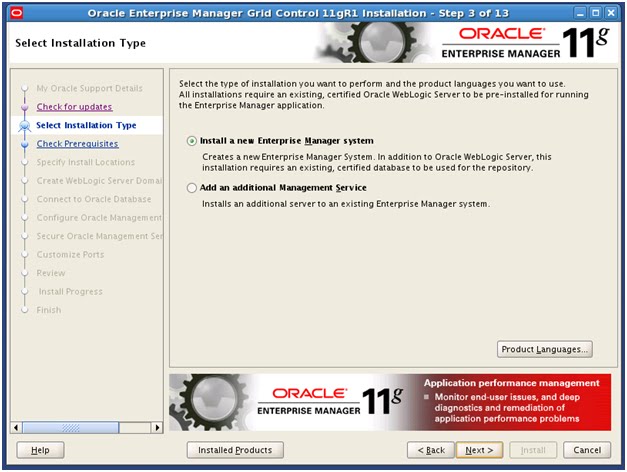
Выбираем Install a new и нажимаем Next.
Нажимаем Next.
Оставляем все без изменений. Нажимаем Next.
Вводим пароли. Нажимаем Next.
Вводим атрибуты базы данных. Нажимаем Next.
Вводим пароль для пользователя SYSMAN. Нажимаем Next.
Вводим пароли и отключаем security агентов. Нажимаем Next.
Нажимаем Next.
Нажимаем Install.
Выполняем скрипт из под root.
[root@em ~]# /u01/app/oracle/middleware/oms11g/allroot.sh

Starting to execute allroot.sh .........

Starting to execute /u01/app/oracle/middleware/oms11g/root.sh ......
Running Oracle 11g root.sh script...

The following environment variables are set as:
    ORACLE_OWNER= oracle
    ORACLE_HOME=  /u01/app/oracle/middleware/oms11g

Enter the full pathname of the local bin directory: [/usr/local/bin]:
The file "dbhome" already exists in /usr/local/bin.  Overwrite it? (y/n)
[n]:
The file "oraenv" already exists in /usr/local/bin.  Overwrite it? (y/n)
[n]:
The file "coraenv" already exists in /usr/local/bin.  Overwrite it? (y/n)
[n]:

Entries will be added to the /etc/oratab file as needed by
Database Configuration Assistant when a database is created
Finished running generic part of root.sh script.
Now product-specific root actions will be performed.
Adding entry to /etc/oratab file...
Finished execution of  /u01/app/oracle/middleware/oms11g/root.sh ......


Starting to execute /u01/app/oracle/middleware/agent11g/root.sh ......
Running Oracle 11g root.sh script...

The following environment variables are set as:
    ORACLE_OWNER= oracle
    ORACLE_HOME=  /u01/app/oracle/middleware/agent11g

Enter the full pathname of the local bin directory: [/usr/local/bin]:
The file "dbhome" already exists in /usr/local/bin.  Overwrite it? (y/n)
[n]:
The file "oraenv" already exists in /usr/local/bin.  Overwrite it? (y/n)
[n]:
The file "coraenv" already exists in /usr/local/bin.  Overwrite it? (y/n)
[n]:

Entries will be added to the /etc/oratab file as needed by
Database Configuration Assistant when a database is created
Finished running generic part of root.sh script.
Now product-specific root actions will be performed.
Finished product-specific root actions.
Adding entry to /etc/oratab file...
Finished execution of  /u01/app/oracle/middleware/agent11g/root.sh ......
[root@em ~]#
Нажимаем Ok.
Соответственно, на данном этапе установка EM GC 11g завершена.
Проверим конфигурацию.
[oracle@em ~]$ echo $ORACLE_HOME
/u01/app/oracle/middleware/oms11g
[oracle@em ~]$ emctl status oms
Oracle Enterprise Manager 11g Release 1 Grid Control
Copyright (c) 1996, 2010 Oracle Corporation.  All rights reserved.
WebTier is Up
Oracle Management Server is Up
[oracle@em ~]$
[oracle@em ~]$ export ORACLE_HOME=$ORACLE_BASE/middleware/agent11g
[oracle@em ~]$ $ORACLE_HOME/bin/emctl status agent
Oracle Enterprise Manager 11g Release 1 Grid Control 11.1.0.1.0
Copyright (c) 1996, 2010 Oracle Corporation.  All rights reserved.
---------------------------------------------------------------
Agent Version     : 11.1.0.1.0
OMS Version       : 11.1.0.1.0
Protocol Version  : 11.1.0.0.0
Agent Home        : /u01/app/oracle/middleware/agent11g
Agent binaries    : /u01/app/oracle/middleware/agent11g
Agent Process ID  : 25152
Parent Process ID : 25135
Agent URL         : https://em.us.oracle.com:3872/emd/main/
Repository URL    : https://em.us.oracle.com:4900/em/upload
Started at        : 2011-08-29 12:54:42
Started by user   : oracle
Last Reload       : 2011-08-29 12:56:01
Last successful upload                       : 2011-08-29 13:12:37
Total Megabytes of XML files uploaded so far :    26.82
Number of XML files pending upload           :        0
Size of XML files pending upload(MB)         :     0.00
Available disk space on upload filesystem    :     9.78%
Last successful heartbeat to OMS             : 2011-08-29 13:12:49
---------------------------------------------------------------
Agent is Running and Ready
[oracle@em ~]$
[oracle@em ~]$ $ORACLE_HOME/bin/emctl upload
Oracle Enterprise Manager 11g Release 1 Grid Control 11.1.0.1.0
Copyright (c) 1996, 2010 Oracle Corporation.  All rights reserved.
---------------------------------------------------------------
EMD upload completed successfully
[oracle@em ~]$
Следовательно, конфигурация работает.
Заключение.
Установка Enterprise Manager Grid Control 11g заняла у меня совсем немного времени (по сравнению с RAC например). Также хочется отметить очень хорошую документацию по установке данного продукта - все очень подробно и с картинками. Единственное, что немного не удобно, так это то, что кроме дистрибутива EM, еще нужно скачивать дистрибутив WLS и дополнительный патч к нему, надеюсь в следующей версии Grid Control данный недостаток будет устранен.